
Download ZenMate – IP Checker, Geo-Location, Privacy & Security Tool
Overview
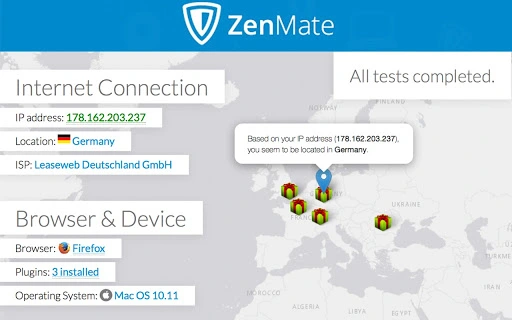
ZenMate offers a lightweight desktop application designed to help users quickly assess their current online identity and network details. The software enables users to check their public IP address, view their geo-location on an interactive map, and identify their ISP, browser, device, and operating system. It serves as a diagnostic tool for individuals concerned about online privacy, security, and digital footprint transparency. The application is particularly useful for users connecting through public Wi-Fi networks, testing network configurations, or verifying their digital location before accessing region-restricted content.
Targeted at both general consumers and privacy-conscious individuals, the tool supports a broad range of use cases, from casual checks of online visibility to preliminary assessments before engaging with privacy-enhancing services. While the developer did not provide additional background on the company’s technical infrastructure or development roadmap, ZenMate is known for its focus on digital privacy and security. The application is available across multiple platforms, allowing consistent functionality for users on Windows, Mac, Linux, Android, and iOS.
Key Features & Capabilities
- IP Address Verification – Displays the user’s current public IP address in real time, helping users confirm their network identity.
- Geo-Location Mapping – Visualizes the user’s approximate physical location on an interactive map, based on IP geolocation data.
- ISP Identification – Reveals the name of the Internet Service Provider associated with the current connection.
- Browser & Device Detection – Shows detailed information about the user’s browser type, version, and device model.
- Operating System Info – Identifies the OS in use, including version and architecture.
- Privacy & Security Insights – Provides a quick overview of the user’s online exposure, especially useful when connecting to unsecured networks.
- Access to Premium Trial – Offers a trial of ZenMate Premium, enabling users to change their IP address, browse privately, and access blocked content.
These features are ideal for users who want to understand their digital footprint without installing complex tools. For example, a traveler on public Wi-Fi can verify their location and ISP to assess potential risks. A remote worker may use the tool to confirm their connection details before accessing sensitive data. The integration with ZenMate’s broader privacy ecosystem allows users to transition seamlessly into enhanced protection, making this tool both a diagnostic and gateway solution.
User Interface, Workflow & Performance
The application features a clean, minimal interface focused on delivering essential information in a clear and accessible format. Navigation is straightforward, with key data displayed in a structured layout that prioritizes readability. Users can quickly access their IP, location, ISP, and device details without requiring technical expertise.
Workflow efficiency is high, as the tool loads and displays information almost instantly upon launch. The application does not require configuration or background processes, making it ideal for on-demand use. The developer did not specify resource usage details, but based on its purpose and size (50MB), it is expected to have low CPU and RAM consumption during operation. Stability appears consistent across platforms, though exact performance data was not provided. No known crashes or freezes were reported in the available documentation.
Compatibility & System Requirements
ZenMate is compatible with Windows, Mac, Linux, Android, and iOS, ensuring broad accessibility across major operating systems. The software is available in version 1.0.0 and has a file size of 50MB. This indicates a lightweight installation that should not impose significant storage demands.
Exact system requirements were not listed. The developer did not provide detailed hardware specifications, such as minimum RAM, processor speed, or disk space beyond the file size. Platform compatibility information is limited to the listed operating systems. Users are advised to ensure their system meets general desktop application requirements for smooth operation.
Pros and Cons
Pros
- Simple, intuitive interface for quick diagnostics
- Real-time display of IP, location, ISP, and device data
- Cross-platform availability on Windows, Mac, Linux, Android, and iOS
- Free to download and use with optional premium upgrade
- Helps users assess online privacy risks on public networks
- Seamless integration with ZenMate’s privacy ecosystem
Cons
- No detailed system requirements provided
- Performance metrics not disclosed by the developer
- Limited functionality beyond basic diagnostics
- Requires internet connection to retrieve data
- Does not offer advanced privacy protection on its own
FAQ Section
Is ZenMate available for all major operating systems?
Yes, ZenMate is available for Windows, Mac, Linux, Android, and iOS, ensuring broad compatibility across desktop and mobile platforms.
Is the software safe to use?
Yes, ZenMate is designed to provide transparent information about your online identity without collecting or sharing personal data. It is trusted by over 20 million users.
Does ZenMate require an account to use?
Basic functionality can be accessed without signing up. However, to trial ZenMate Premium or access advanced features, registration is required.
Can I use ZenMate offline?
No, the application requires an active internet connection to retrieve IP, location, and device information from remote servers.
What is the difference between the free tool and ZenMate Premium?
The free tool provides diagnostic data such as IP address, location, and device details. ZenMate Premium offers full privacy protection, including IP masking, encrypted browsing, and access to restricted content.
Final Thoughts + CTA
ZenMate delivers a fast, reliable way to check your online identity and assess your digital exposure. Its clean interface and cross-platform support make it accessible to users of all skill levels. While it functions primarily as a diagnostic tool, it serves as a valuable first step toward better online privacy.
The integration with ZenMate Premium allows users to enhance their security seamlessly. For anyone concerned about their digital footprint, especially when using public Wi-Fi, this tool is a must-have. Download ZenMate now.







